
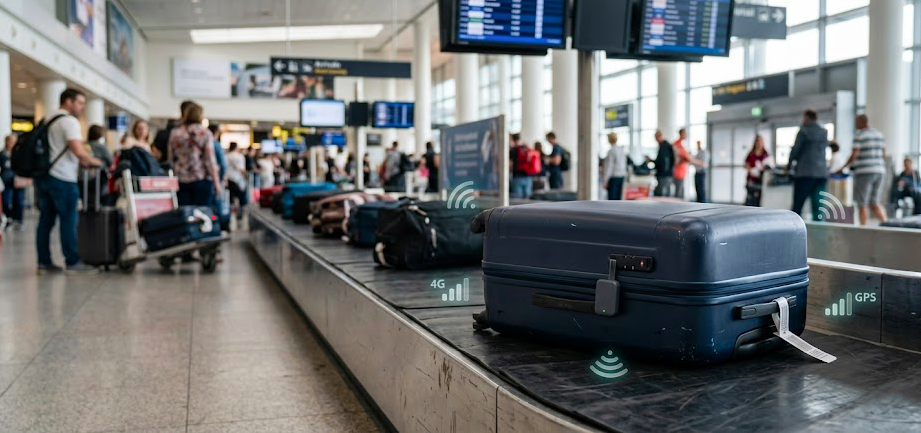
Losing a checked bag can turn a routine trip into a frustrating wait. A missed connection, rerouted flight, or baggage-handling mistake can leave your suitcase hundreds or even thousands of miles away from you.
The problem is that an airline’s baggage system may only tell you that your bag is delayed. You still have no idea where it went or whether it’s moving toward your destination. That uncertainty gets worse when you’re traveling internationally or waiting between connecting flights.
A GPS tracker for luggage gives you another way to keep tabs on your bag. GPS/GNSS technology determines the tracker’s location, while a cellular connection sends that information to your phone. Bluetooth trackers take a different approach, using nearby phones to relay location data. They work well in crowded places such as airports, while GPS trackers can continue reporting from areas with few nearby devices.
In this guide, you’ll learn how luggage trackers work, which types are allowed in checked bags, and which option makes the most sense for your travel habits.
What Is a GPS Tracker for Luggage?
A GPS tracker for luggage is a small device that reports its location using GPS or GNSS satellite signals, then sends that data to your phone over a cellular network. You drop it in a bag. And it periodically pings its position so you can check it from an app; devices like Spacehawk mini GPS tracker are built specifically for slipping into a suitcase or bag pocket without adding bulk.
- How GPS/GNSS location tracking works: The tracker communicates with satellites orbiting the earth to calculate its position. This works independently of nearby phones or WiFi networks, which is why GPS trackers can report a location in places with little foot traffic.
- How cellular networks send location updates: Once the tracker calculates its position, it needs a way to send that data to you. Most luggage trackers use a built-in cellular connection (similar to a small SIM card) to transmit updates, which is why many require a data plan or subscription.
- GPS tracker vs. Bluetooth luggage tag: A Bluetooth tag, like an Apple AirTag or similar tile-style tracker, doesn’t have its own cellular connection. Instead, it broadcasts a signal that nearby devices pick up and relay to the network. That makes it cheaper and smaller, but dependent on device density in the area.
How GPS and Bluetooth Luggage Trackers Work
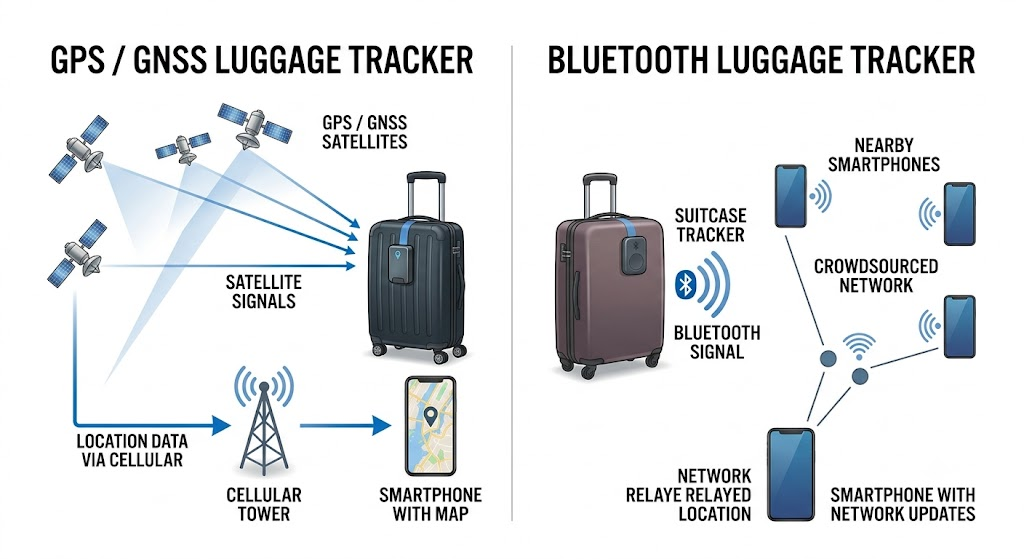
GPS and Bluetooth luggage trackers use different ways to report a bag’s location. GPS/GNSS trackers calculate their position using satellites, while Bluetooth trackers depend on nearby smartphones to detect and report their location.
GPS/GNSS Trackers
A GPS/GNSS tracker calculates its own location by receiving signals from navigation satellites. The device then uses a cellular connection to send that location to your phone or tracking app.
- Satellites: Determine the tracker’s position.
- Cellular data: Sends the location to your tracking app.
- Coverage: Works across large areas where the tracker can reach a cellular network.
- Updates: Can provide frequent location updates without relying on nearby smartphones.
This setup makes GPS trackers useful beyond airports, especially when luggage moves between terminals, baggage facilities, roads, and other areas with limited foot traffic.
Bluetooth Trackers
Bluetooth trackers use a short-range signal rather than a built-in GPS connection. A nearby smartphone detects the tracker and sends its location through a compatible crowdsourced finding network.
- Bluetooth signal: Broadcasts the tracker’s presence over a short distance.
- Nearby phones: Detect the signal when they come within range.
- Crowdsourced network: Relays the detected location to your tracking account.
- No cellular plan: The tracker itself doesn’t need a mobile data connection.
The tracker doesn’t calculate its own GPS position. Its location appears when another compatible device detects it and reports where the tracker was found.
How Crowdsourced Phone Networks Help
Crowdsourced networks make Bluetooth luggage trackers useful in busy places. Apple’s Find My network and similar services use participating devices to detect nearby trackers and relay their locations.
Airports are a strong environment for this system because thousands of travelers carry compatible smartphones. A misplaced bag sitting in a busy terminal may be detected repeatedly as people move past it.
Can You Put a GPS Tracker in Checked Luggage?
Yes, in most cases. Airlines generally allow small electronic trackers containing lithium batteries in checked luggage, following the same battery guidelines that apply to other consumer electronics.
- Airline rules for luggage trackers: Most major airlines permit GPS and Bluetooth luggage trackers in both carry-on and checked bags, as long as the device’s battery falls under standard size limits.
- Battery requirements: Lithium button-cell or coin-cell batteries under 100 watt-hours, which is what most consumer trackers use, are typically allowed without extra paperwork. Larger lithium batteries may face restrictions.
- Spare batteries and power banks: If your tracker requires spare batteries or a separate power bank for charging, note that loose lithium batteries and power banks are usually restricted to carry-on luggage only, not checked bags.
- International travel considerations: Rules can vary slightly by country and airline, so it’s worth checking with your specific carrier before an international trip, particularly if you’re connecting through multiple airlines.
What Can a GPS Tracker Tell You About Delayed Luggage?
A luggage tracker can give you a clearer picture of what’s happening when your bag is delayed. The most recent location can show where the bag was last detected, sometimes with more detail than the airline’s baggage system provides.
Location history can also show whether the bag is still moving through the airport or has remained in one place, such as a sorting facility. Sharing tracker coordinates and timestamps with airline staff can support your delayed or lost baggage report and give them another clue to work with. Still, location updates aren’t guaranteed. A dead battery, poor cellular coverage, or heavily shielded cargo areas can prevent the tracker from sending its location.
GPS vs. Bluetooth Trackers for Luggage
GPS and Bluetooth trackers differ mainly in how they find and report a bag’s location. GPS trackers use satellite positioning and cellular networks, while Bluetooth trackers rely on nearby compatible devices to detect them.
Range and Coverage
GPS trackers can report a location across large areas as long as the device has access to a compatible cellular network. Bluetooth trackers have a much shorter direct range and need participating smartphones nearby to relay their location.
Location Updates
GPS trackers can send updates at a set interval, such as every few minutes or several hours, depending on the device and settings. Bluetooth trackers don’t follow a fixed update schedule. They report a new location when a compatible device detects the tag.
Battery Life
Bluetooth trackers usually run much longer because they use very little power. GPS trackers consume more energy, especially when configured for frequent location updates, so they generally need more regular charging.
Cellular Fees
Most GPS trackers require a monthly or annual cellular subscription because the device uses mobile networks to send location data. Bluetooth trackers typically have no recurring connectivity fee because they use existing crowdsourced phone networks.
Airport Performance
Both technologies can work well in airports. Bluetooth trackers benefit from the large number of compatible smartphones moving through terminals, while GPS trackers can continue reporting their position without depending on nearby phones.
International Travel
GPS trackers with international roaming can provide coverage across multiple countries, although service availability and subscription costs vary by provider. Bluetooth trackers depend on the number of participating devices in the areas your luggage passes through.
GPS vs. Bluetooth Luggage Trackers: Comparison

|
Feature |
GPS Tracker |
Bluetooth Tracker |
|
Nearby phone required |
No |
Yes |
|
Location source |
GPS/GNSS + cellular |
Nearby compatible devices |
|
Update frequency |
Set by device and settings |
When detected by a nearby device |
|
Connectivity fee |
Usually required |
Usually none |
|
Battery life |
Typically shorter |
Typically longer |
|
Airport tracking |
Strong |
Strong in busy areas |
|
Remote-area tracking |
Better with cellular coverage |
Limited by device density |
|
International tracking |
Depends on roaming coverage |
Depends on participating devices |
|
Best suited for |
Frequent travelers and broader coverage |
Short trips and crowded locations |
Features to Check Before Buying a Luggage Tracker
- GPS accuracy: Look for a tracker with a tight accuracy radius, ideally within a few meters under good conditions.
- Update frequency: Decide how often you want location pings; more frequent updates use more battery.
- Battery life: Match the battery life to your typical trip length so it doesn’t die mid-journey.
- Cellular coverage: Confirm the tracker’s network works in the countries you travel to most. Providers like Outlaw Trailer GPS offer trackers built around reliable nationwide cellular coverage for small or big assets.
- Roaming support: For international trips, check whether roaming is included or requires an add-on.
- Tracker size and weight: Smaller, lighter trackers are easier to tuck into a bag without adding bulk.
- Water resistance: Luggage gets rained on and handled roughly, so some water resistance is a plus.
- App alerts: Look for notifications for movement, low battery, or the bag leaving a set area.
Common Luggage Tracker Mistakes
Luggage trackers work best when you set them up correctly before a trip. Placing a tracker deep inside a bag or wrapping it in metal-lined items can weaken its signal and make location updates less reliable. You also need to keep the device charged because a dead tracker can’t report anything. Before flying internationally, check the tracker’s battery type and the airline’s rules for electronic devices.
A tracker should also support your airline’s baggage claim process, not replace it, so file an official report if your bag is delayed or lost. Finally, keep the tracker’s serial number, model, and app login details accessible in case airline staff need that information while searching for your luggage.
What to Do If Your Luggage Is Lost or Delayed
- Report the bag to the airline at the baggage service desk before leaving the airport.
- Check the tracker location as soon as possible for the bag’s most recent reported position.
- Share useful location information with airline staff, including timestamps and coordinates if available.
- Keep your baggage claim details, including your claim number and any paperwork given by the airline.
- Contact the airline before taking further action, since most carriers have a set process and timeline for locating delayed bags.
Conclusion
A GPS tracker for luggage won’t guarantee your bag never goes missing, but it gives you something the airline’s system often can’t: a real-time answer to “where is it right now.” For travelers who fly internationally, connect through multiple airports, or simply want peace of mind on every trip, a GPS tracker’s independence from nearby devices makes it the more dependable option. Bluetooth trackers still have their place; they’re lightweight, affordable, and effective in high-traffic areas like terminals, but they lose accuracy the moment a bag moves somewhere quiet.
Before you buy, match the tracker to how you actually travel: check battery life against your typical trip length, confirm roaming support if you fly abroad, and always pack it somewhere it can get a clear signal. And if a bag does go missing, treat the tracker as a supporting tool, not a replacement. File the report with the airline first, then use your tracker’s location data to help their team find it faster.
FAQ
Can I put a GPS tracker in checked luggage?
Yes, most GPS trackers use small lithium batteries that are allowed in checked bags under standard airline battery rules.
Do GPS luggage trackers work on airplanes?
Trackers generally don’t transmit while a plane is in flight and a cellular signal is unavailable, but they’ll typically report location again once the plane lands and connects to a network.
Is GPS better than AirTag for luggage?
GPS trackers tend to offer more consistent tracking in remote areas or during international travel, while Bluetooth trackers like AirTags work well in populated areas but depend on nearby devices.
Do GPS luggage trackers work internationally?
Many do, provided the tracker supports international roaming or a global cellular network; check this before relying on one abroad.
How long does a luggage tracker battery last?
This varies by device and update frequency, ranging from a few days to several weeks on a single charge.
 By
By 


