
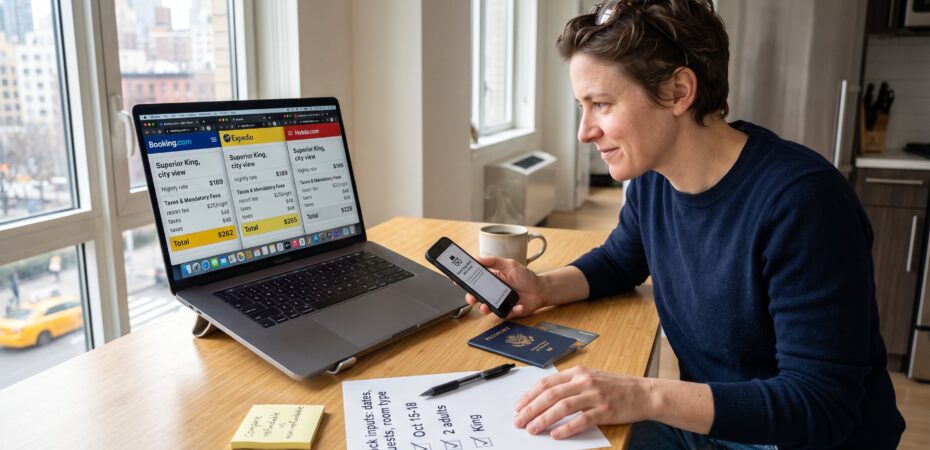
How to compare hotel prices across booking sites starts with fixing dates and one exact room type. That small discipline often saves hundreds of dollars and prevents surprise fees. This guide lays out why price checks matter, which sites to search first, a step‑by‑step method for true side‑by‑side comparison, how to spot hidden costs, and the tools that speed the work. The instructions are practical, concrete, and built for travellers who want to act fast and avoid regrets.
Key Takeaways
- Comparing hotel prices across booking sites starts by fixing exact dates and room types to avoid misleading differences and save money.
- Total checkout amounts, including taxes and mandatory fees, should be compared rather than just the base nightly rate to uncover true savings.
- Begin price searches with metasearch engines, confirm on major OTAs, and finally check the hotel’s official site for the best deals and accurate policies.
- Use a consistent step-by-step method to record base rates, fees, cancellation policies, and perks side by side for effective comparison.
- Be vigilant for hidden fees, rate restrictions, and false discount claims by verifying prices across multiple sites and directly contacting hotels when uncertain.
- Utilize browser extensions and price tracking tools to monitor total prices and alert you to sudden drops, enhancing efficiency and savings.
Why Comparing Hotel Prices Pays Off (And What Often Gets Overlooked)
Fact: different booking sites frequently show different totals for the same room and dates. A single-night rate can vary by 10–40% after taxes and mandatory fees are added.
Comparing prices pays because savings come from the total checkout amount, not the headline nightly rate. Many travellers focus on the base price and miss mandatory resort or occupancy fees that add $10–50 per night. They also overlook rate restrictions: some cheap rates are non‑refundable, block loyalty points, or require prepayment.
A common oversight: not fixing the inputs. If dates, number of guests, currency, or mattress type differ between searches, the comparison becomes meaningless. Another frequent mistake is trusting a “discounted” rack rate without checking the hotel’s own site or member portals: some discounts are calculated from inflated references.
Real example: one traveller saved $186 on a four‑night stay by switching from a non‑refundable OTA rate to a refundable hotel direct rate that included breakfast and no resort fee. That outcome came from comparing total prices and cancellation rules side by side.
Where To Search First: Which Booking Sites And Sources To Include
Insight: start with aggregators, then confirm on OTAs and the hotel site. Meta‑search engines scan dozens of sources at once and reveal price variance quickly. Aggregators like large metasearch pages pull results from Booking.com, Expedia, Agoda, and smaller local sites, which makes them an efficient first pass.
Next, check major OTAs directly (Booking.com, Expedia, Hotels.com, Agoda, Priceline). After finding competitive quotes, visit the hotel’s official website to compare identical room types and benefits. For business or group travel, also search corporate or loyalty portals, corporate rates sometimes beat public OTAs.
TravelTweaks research recommends using this flow because it captures wholesale and retail inventory differences. For a deeper primer on booking strategy and where these pieces fit in, see the short guide on hotel booking basics which explains how to organize searches for better outcomes.
Pro tip: include at least one local OTA if travelling to markets like Southeast Asia or Latin America: those sites sometimes have exclusive inventory or currency advantages.
A Step‑By‑Step Process For Accurate Side‑By‑Side Price Comparison
Core step: use identical search inputs across every site. Fix dates, guest count, currency, and the exact room type before recording prices. A disciplined checklist prevents apples‑to‑oranges comparisons.
Step 1, Lock inputs. Open a private browser window to avoid personalized pricing and set currency to the one you will pay in.
Step 2, Choose one exact room type. Match bed type, view, and meal plan. If a room says “Superior King with city view,” don’t compare it to “King room, city or partial view.”
Step 3, Record three numbers per site: base nightly rate, total taxes and mandatory fees, and the final total payable at checkout. Also note whether breakfast is included.
Step 4, Capture policies: refundable vs non‑refundable, cancellation deadline, prepayment requirement, and loyalty points eligibility.
Step 5, Compare totals and policies side by side and prefer the lowest total that matches the desired flexibility. If two totals tie, favor the option that earns points or includes perks.
How To Spot Hidden Fees, Rate Restrictions And False Discounts
Direct fact: hidden fees and rate rules cause most booking regrets. Be skeptical of deep discounts that appear only after selecting non‑standard payment or membership options.
Look for fees that appear late in the process: “resort” or “destination” fees, mandatory service charges, or city taxes. Verify whether the site collects these fees at checkout or the hotel collects them on arrival. Also watch for rate restrictions: member‑only prices, minimum stay requirements, and no‑points rates.
Check discount claims against multiple sources. Some platforms display a “save 30%” badge calculated from a higher reference price: verify by comparing the same room on two other OTAs and the hotel site.
Honest mistake to avoid: booking a cheaper OTA rate that blocks earning loyalty points. That decision can cost more in lost perks than the immediate saving. When in doubt, call the hotel and ask whether a rate includes mandatory fees or blocks benefits, the answer is often definitive.
Tools, Extensions And Alerts That Speed Up Price Comparison
Immediate insight: the right tools save time and reveal late fees. Use browser extensions that overlay competitor prices and price‑tracking alerts that monitor drops for specific hotels.
Recommended tools include metasearch apps that show all‑in pricing, browser extensions that display OTA and hotel totals side by side, and price trackers that notify travellers of drops. Mobile apps can aggregate 100+ platforms and show final checkout prices without hidden charges.
Practical setup: install an extension that reveals the total payable and pair it with a price alert for the hotel room. This combo caught a 27% drop for one trip three days before booking, saving the traveller $98.
Further reading: travellers who want procedural frameworks should read the clear booking approach in the TravelTweaks piece on the hotel booking framework. For policy details about cancellations, consult the TravelTweaks guide on cancellation policies.
Safety verification: when choosing unfamiliar properties, consult an expert checklist like the one on choosing a safe hotel to confirm location and security factors before booking.
Also consider TravelTweaks lists of hacks and site recommendations for additional options and quick comparisons on best booking platforms and simple saving tactics found in the site’s saving hacks.
Conclusion: Focus on the total payable, identical room attributes, and policies, not just the headline rate. With disciplined inputs, a short checklist, and one or two tools, travellers can uncover real savings and avoid fee‑driven surprises.
 By Amey Myers


